
Sell merch directly to your fans
Your music and your merch, together in one place.
Turn your BandPort profile into a complete online shop. Sell CDs, vinyl, T-shirts and more, with secure payments, stock management, shipping rates and orders — all in one place.
Full E-shop is included in BandPort PRO.

How your shop works
From discovering your merch to placing an order — without leaving your BandPort profile.
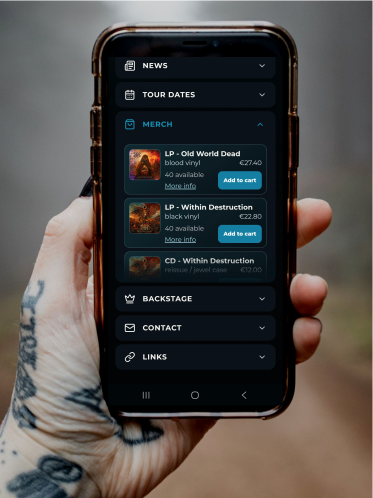
- Fans explore your merch. Your products appear alongside your music and other band content.
- They choose what they want. Fans can select products, sizes and available variants, then add them to their cart.
- Shipping is calculated for their destination. Your configured shipping rates determine where you sell and how much delivery costs.
- They pay securely. Checkout and payments are handled through Stripe.
- You receive the order. See what was purchased, check the payment status and prepare the items for shipping.
- You handle fulfillment. Pack and ship the order, then mark it as shipped and add tracking details when available.
Your fans get a straightforward way to buy. You get the tools to manage the sale.
Everything you need to sell merch
Products & Inventory
Keep your catalog, prices and stock organized.
- Showcase CDs, vinyl, apparel and other physical merchandise.
- Add product images, descriptions and prices.
- Offer different sizes and product variants.
- Manage individual SKUs and available stock.
- Keep track of product availability.
- Add up to 100 products with PRO.
Payments & Checkout
Let fans buy directly from your band profile.
- A shopping cart for multiple products.
- Secure Stripe Checkout.
- Online payments through your connected Stripe account.
- One selected selling currency for your shop.
- Order totals that include the applicable shipping charge.
Shipping & Orders
Know what you've sold and what needs to go out.
- Set shipping rates for supported destinations and country groups.
- Choose which destinations you ship to.
- View orders and their payment status.
- See which paid orders are ready to ship.
- Review customer and delivery details.
- Mark orders as shipped and record tracking information when available.
Emails & Documents
Keep your customers informed and your orders organized.
- Automated transactional emails for supported order events.
- Payment and order confirmation information.
- Access to Stripe invoices for paid orders when available.
- Order-related documents and seller information.
- Visibility into payment problems, refunds and disputes.
BandPort helps manage the online sale. Your band remains responsible for packing, shipping, returns and applicable seller obligations.
Three ways to offer merch
Start with what works for your band. Move to a full shop when you're ready.
Merch Request
Available in FREE & PRO
Show your merch and let fans send you an inquiry. You arrange payment and delivery directly with the customer.
A simple option if you only receive occasional orders or prefer to handle sales yourself.
External Links
Available in FREE & PRO
Already selling through another online store? Add product links and send fans straight to your existing checkout.
Keep your current store while bringing your merchandise into your BandPort profile.
Full E-shop
Available in PRO
Let fans add products to a cart, pay online and place orders directly through your BandPort profile.
Manage products, stock, shipping rates and orders together, without maintaining a separate shop website.
FREE includes up to 3 merch products. PRO supports up to 100 products and unlocks Full E-shop.
Set up your shop
Get your store ready in a few clear steps.
- Connect Stripe. Link your payment account and complete the required payment verification.
- Add your seller details. Set up your business or seller information, contact details and returns policy.
- Create your products. Add photos, descriptions, prices, sizes and variants.
- Set your stock. Enter the available quantities for the products you want to sell.
- Configure shipping. Choose supported delivery destinations and set the relevant shipping rates.
- Publish your shop. Once the required setup is complete, your products can become available for purchase.
You control your products, pricing and fulfillment. BandPort provides the tools for the online shop and checkout.
Frequently Asked Questions
You can showcase up to 3 products on FREE and use Merch Request or External Links.
To accept purchases directly through a BandPort shopping cart and checkout, you need PRO and a configured Full E-shop.
Fans can shop through your public BandPort profile. The shop checkout collects the customer and delivery information required to complete the order; it does not require fans to create a BandPort band account.
Payments are processed through your connected Stripe account. Stripe manages payment processing and payouts according to your account configuration and payout schedule.
BandPort does not hold your merchandise or ship orders on your behalf.
Stripe payment-processing fees may apply. BandPort PRO is a separate paid subscription.
Check the current BandPort pricing and terms, together with Stripe's fees for your account and country, before starting sales.
Yes. You can configure shipping zones and rates for supported destinations.
Fans can complete checkout only for destinations where your shop has an active shipping rate.
Your band is the seller and remains responsible for packing, shipping, customer service, returns and applicable legal obligations.
BandPort helps you manage orders and fulfillment information.
Full E-shop requires an active PRO plan. Switching to FREE removes the ability to offer new purchases through the Full E-shop checkout.
Your existing order records and retained shop data are not simply erased when your plan changes. You should complete outstanding orders and check your seller obligations before cancelling PRO.
Ready to sell merch from your own band profile?
Bring your music and your shop together. Start with a free BandPort profile, then unlock Full E-shop with PRO whenever you're ready to sell directly.